
Few product categories cause as many returned containers as USB cables — and the reason is almost never the cable itself. It is the connector. A buyer specifies “USB cable”, receives a perfectly good USB 2.0 cable, and then discovers their application needed a 10 Gbps link, a 240 W power path, or a Type-B plug rather than a Micro-B. This guide walks through every USB connector family that is still shipping in volume in 2026, tells you the pin count and the real speed behind each shape, and explains what to write on a purchase order so the shipment matches the drawing.
Plug or receptacle? Get the language right first
Before the shapes, two words: a plug (also called male) is the end you hold and insert; a receptacle (also called female) is the socket that is soldered into the device or the panel. A cable order almost always needs a plug on both ends, while the device manufacturer buys receptacles separately. Mixing the two up in a specification is the single most common cause of a wrong first sample.
The second thing to fix is the naming mess. USB-IF has renamed the same technology several times: what the market called USB 3.0 became USB 3.2 Gen 1×1, USB 3.1 Gen 2 became USB 3.2 Gen 2×1, and the 20 Gbps two-lane mode is USB 3.2 Gen 2×2. Because of that, the words “USB 3.0” printed on a retail box tell you almost nothing — the only reliable question is which data rate and which power level do you need.
The connector families at a glance
Every USB connector still in production belongs to one of three families — the standard “Type” size, Mini and Micro. The chart below shows all of them side by side, including the SuperSpeed variants that added pins for higher data rates:
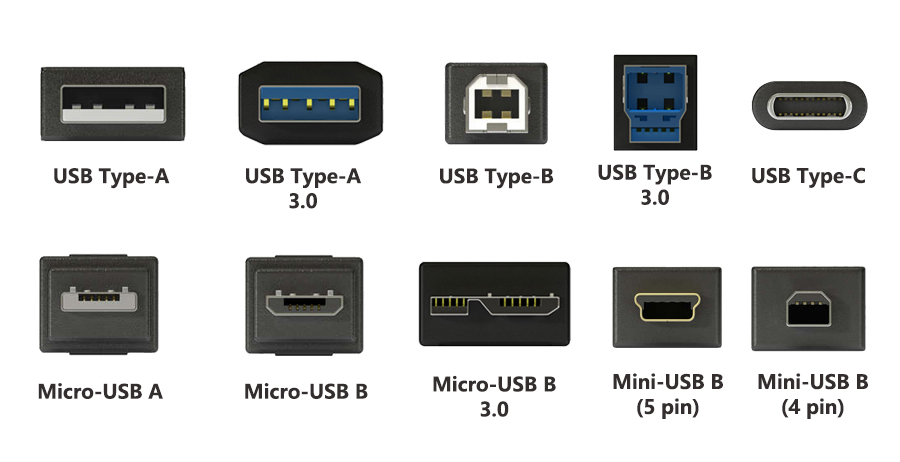
Figure 1 — the ten USB connector variants still seen in volume orders: standard Type-A and Type-B (USB 2.0 and 3.0 versions), Type-C, the Micro-USB family and the two Mini-USB B variants.
| Connector | Pins | Typical data rate | Status in 2026 | Seen on |
|---|---|---|---|---|
| Type-A (Standard-A) | 4 (9 for 3.0) | 480 Mbps – 10 Gbps | Widely used | PCs, hubs, chargers, wall sockets |
| Type-B (Standard-B) | 4 (9 for 3.0) | 480 Mbps – 10 Gbps | Declining, still spec’d | Printers, scanners, audio interfaces |
| Mini-USB (Mini-B) | 4 or 5 | 480 Mbps | Deprecated (Mini-A/AB, May 2007) | Legacy cameras, GPS, industrial panels |
| Micro-USB (Micro-B) | 5 (10 for SS) | 480 Mbps – 5 Gbps | Still shipping in volume | Power banks, budget phones, IoT, CCTV |
| Type-C | 24 | 480 Mbps – 80 Gbps | The default since 2014 | Laptops, phones, docks, monitors, everything |
Table 1 — the five connector families, their pin counts and the data rates each is actually capable of. Pin count matters: a 9-pin Type-A carries SuperSpeed pairs that a 4-pin Type-A does not have.
1. USB Type-A — the host-side rectangle
Type-A is the flat rectangular connector that has been on the host side of every PC since 1996. The USB 2.0 version has 4 pins (VBUS, D−, D+, GND) and carries 480 Mbps at up to 0.5 A, extendable to 1.5 A on a dedicated charging port. The 3.0 version added a second row of five contacts for the SuperSpeed pairs — visually it looks identical from the front, which is exactly why buyers get fooled: the plug is the same, the electrical capability is not.
- Choose Type-A when: the cable plugs into a PC, a hub, a charger brick or a wall outlet.
- Specify it as: “USB Type-A male, 4-pin USB 2.0” or “USB 3.0 Type-A male, 9-pin”. Never just “USB A”.
- Watch out for: extension cables that drop the SuperSpeed pins and silently halve the link to 480 Mbps.
2. USB Type-B — the device-side square
The standard Type-B plug is nearly square with a chamfered top, and it is still the connector on the back of most printers, scanners, label printers and USB audio interfaces. Like Type-A it exists in a 4-pin (USB 2.0) and a 9-pin (USB 3.0) version, and the 3.0 plug usually has a taller blue-coloured shell so the two cannot be confused physically.
In our own catalogue this is the USB A-to-B printer cable family — a product we build in custom lengths from 0.5 m to 5 m with optional ferrite cores. A real production example is shown below:
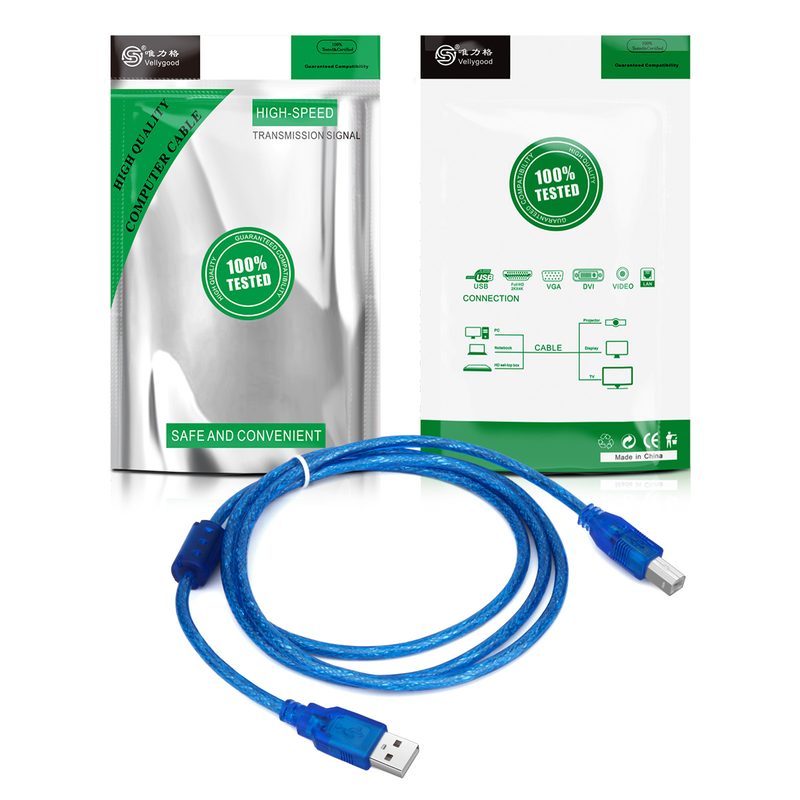
Figure 2 — a real Type-A to Type-B USB 2.0 printer cable from our production line. Note the square Type-B shell and the chamfered top edge.
3. Mini-USB — small, useful, and officially deprecated
Mini-USB arrived with USB 2.0 in 2000 and became the standard for early digital cameras, GPS units and industrial handheld terminals. The Mini-B plug has a distinctive trapezoidal shell, and it comes in a 5-pin and a 4-pin version (the 4-pin variant omits the ID pin and was widely used by camera makers). USB-IF deprecated Mini-A and Mini-AB in May 2007, and Mini-B use declined in favour of the thinner Micro format — but the connector never fully disappeared, because industrial equipment is designed to be maintained, not replaced.
- Still specified for: industrial panels, measurement instruments, legacy camera accessories, aftermarket spares.
- Buyer tip: always state 4-pin or 5-pin. The two plugs look similar and only one fits the device.
- Typical order: long runs for machine builders, often with strain relief and screw-locking boot options.
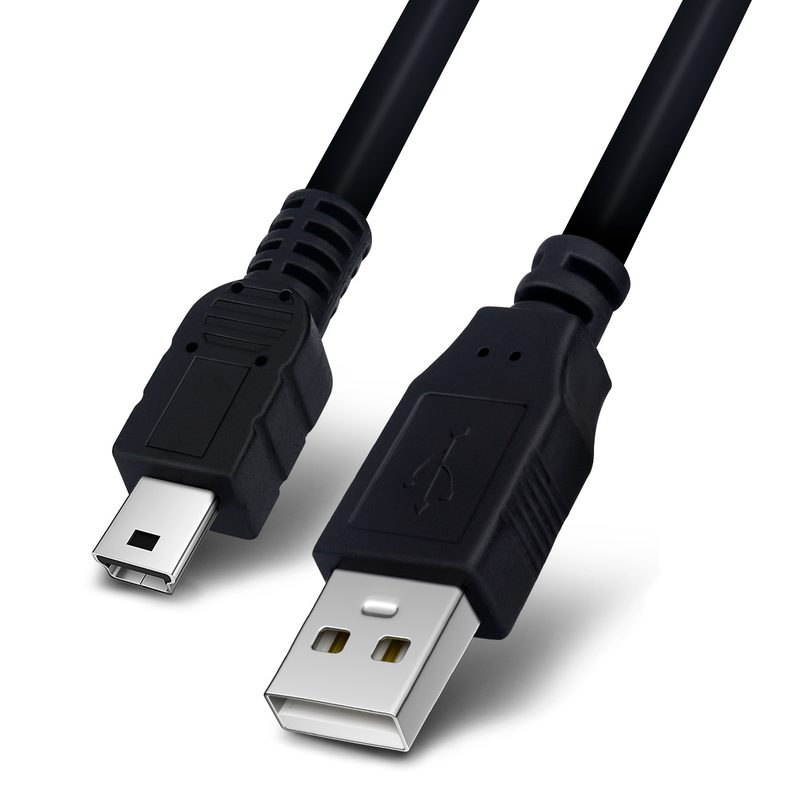
Figure 3 — a Type-A to Mini-USB cable manufactured in our factory, the format still ordered by machine builders and camera accessory brands.
4. Micro-USB — the family that refuses to die
Micro-USB was introduced in January 2007 for devices thinner than Mini-USB, and it is the connector family buyers most often get wrong, because there are four distinct variants:
- Micro-A (5-pin, slightly different shell) — host side, largely historical.
- Micro-B (5-pin) — the everyday charging and data connector on power banks, budget phones, game controllers, CCTV cameras and IoT modules.
- Micro-B SuperSpeed (10-pin) — a wider plug with a divided opening that carries USB 3.0 pairs; used on portable hard drives and high-speed instruments.
- Micro-USB 3.0 — the same 10-pin body, sometimes described by its superseded USB 3.0 name.
Micro-B remains in volume because it is cheap, mechanically robust and locked into product designs that are still being manufactured. If your BOM says Micro-B, it will keep being available — but if you are designing a new product in 2026, Type-C is the safer long-term choice.
5. USB Type-C — 24 pins, reversible, and the only route to USB4
Type-C was introduced in 2014 and has since become the single connector for data, video and power. It has 24 pins, is fully reversible, and it is the only connector that supports the two-lane USB 3.2 modes (10 Gbps and 20 Gbps) and every USB4 mode. Power Delivery 3.1 with Extended Power Range raises the ceiling to 240 W (48 V at 5 A) in either direction. Two technical details decide whether a Type-C cable can actually deliver those numbers:
- The E-Marker chip. Any cable rated above 3 A, or supporting SuperSpeed data, must contain an electronic marker that reports the cable’s capability to the charger and device. A 240 W cable without an E-Marker is a 60 W cable with a marketing label.
- Copper cross-section and construction. Higher current means thicker conductors, better thermal design and a bypass capacitor with a higher voltage rating. This is where a cheap cable is genuinely a different product, not just a cheaper one.
Type-C also carries DisplayPort Alt Mode, which is why the same connector can drive a monitor, and it is used for Thunderbolt and for the video converters in our DP and Type-C adapter range. A real example of a Type-C power product from our line:
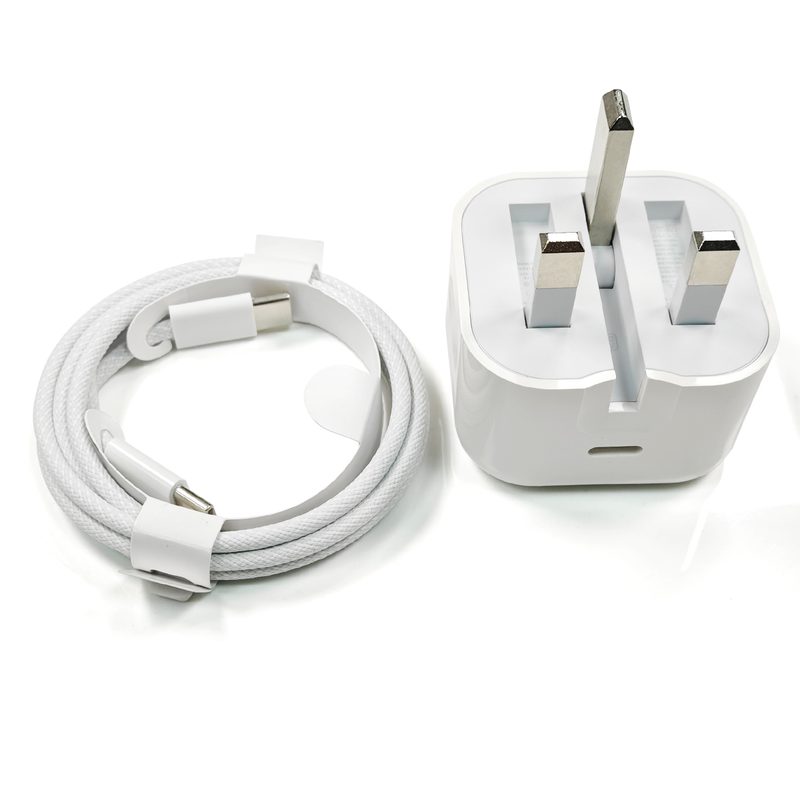
Figure 4 — a Type-C PD charger adapter we supply. When the port is Type-C, the power profile (20 W, 65 W, 100 W or 240 W) must be stated on the order, not assumed.
The speed ladder behind the connectors
Connector shape and data rate are two separate decisions. The ladder below maps the USB-IF naming onto the rates buyers actually care about, together with the connectors that support each level:
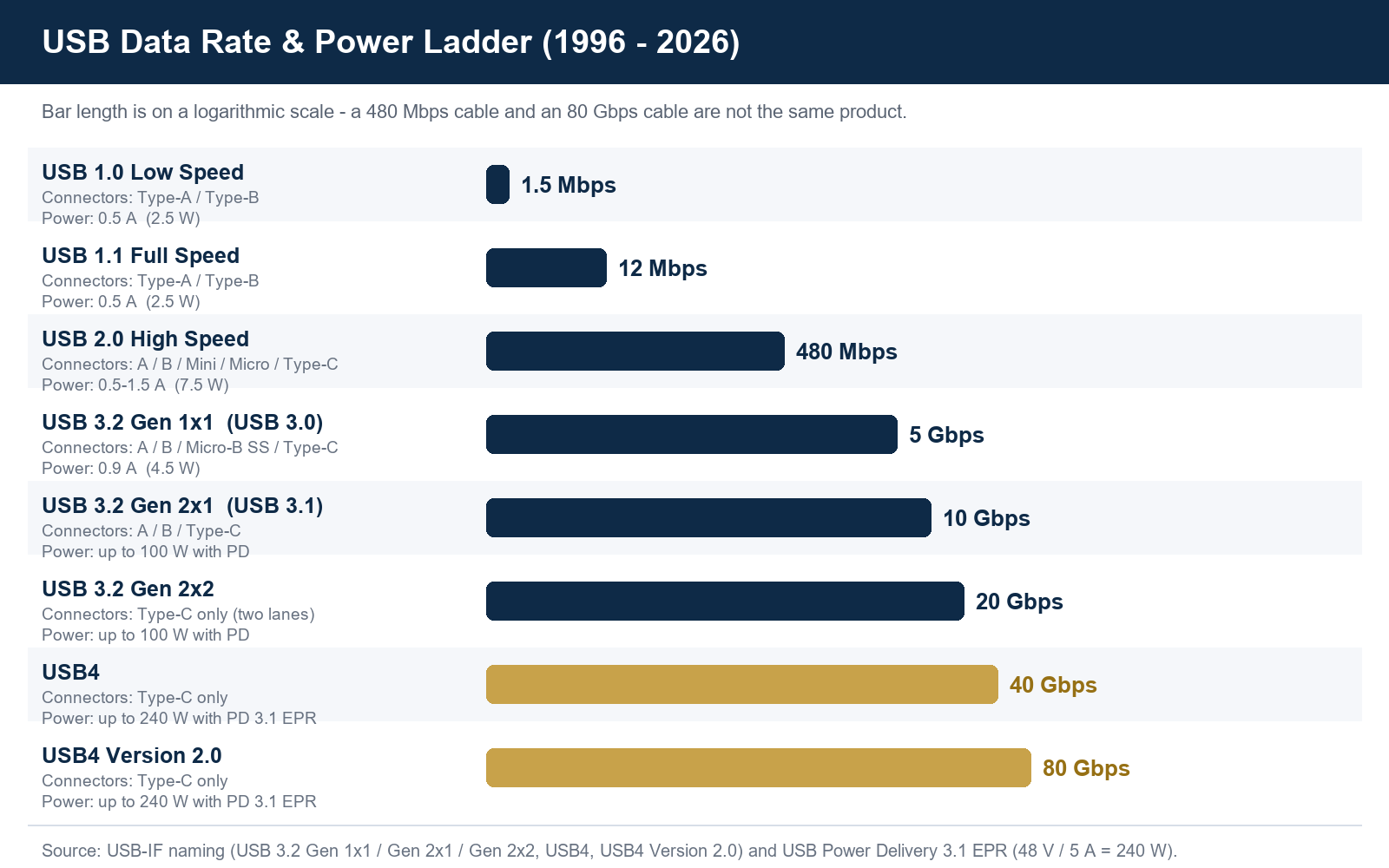
Figure 5 — USB data rate and power ladder, 1996–2026. USB4 Version 2.0 (80 Gbps) and every two-lane mode are Type-C only.
| Marketing name you will see | USB-IF name | Rate | Practical note for buyers |
|---|---|---|---|
| USB 2.0 / Hi-Speed | High-Speed | 480 Mbps | Charging + basic data; the most common source of “why is it slow” complaints |
| USB 3.0 | USB 3.2 Gen 1×1 | 5 Gbps | Needs 9 pins on Type-A/Type-B, 10 pins on Micro |
| USB 3.1 | USB 3.2 Gen 2×1 | 10 Gbps | Strictly limited cable lengths; active cables needed beyond ~2 m |
| — | USB 3.2 Gen 2×2 | 20 Gbps | Type-C only, both lanes; very few devices actually use it |
| USB4 | USB4 | 40 Gbps | Type-C only; requires certified 40 Gbps cable and E-Marker |
| USB4 v2.0 | USB4 Version 2.0 | 80 Gbps | Announced September 2022; check cable certification before promising it |
Table 2 — the naming trap, resolved. When a supplier quotes “USB 3.0”, ask for the Gen number and the pin count in writing.
What to write on the purchase order
Most connector mistakes are prevented by eight lines on the PO. We ask every buyer for these, and the ones who supply them receive the right sample the first time:
- Connector A and connector B — family, gender and pin count (“Type-A male 9-pin to Type-B male 4-pin”).
- Data rate — the USB-IF Gen number, not the marketing version.
- Power requirement — voltage, current and wattage; state whether an E-Marker is required.
- Conductor specification — copper grade, AWG or cross-section, and whether power and data pairs are separately shielded.
- Length and tolerance — including whether the length must be consistent across reels.
- Jacket and colour — PVC, TPE or LSZH, plus the colour reference.
- Marking — logo print on the overmould or the jacket, and whether a certification mark must appear on the product.
- Packaging and market — poly bag, colour box or blister, and the destination country, because labelling rules follow the market.
Five mistakes that cost buyers real money
- Ordering “USB 3.0” without a pin count. You may receive a 4-pin 480 Mbps cable that physically fits and electrically fails.
- Assuming every Type-C cable is fast. A charging cable can legitimately be USB 2.0 inside. If the application moves data, state the rate.
- Buying 240 W without an E-Marker. The cable will fall back to a lower power profile, and the end customer will blame the charger.
- Confusing Micro-B with Micro-B SuperSpeed. The 5-pin and the 10-pin plugs are not interchangeable, and the 10-pin version is wider.
- Ignoring the market’s compliance set. For the EU, cable assemblies ship within the CE and RoHS framework; third-party reports are the evidence behind the claim, and we can add SGS testing when a buyer needs it.
How we build USB cables at Senye Cable
Guangzhou Senye Network Technology Co., Ltd. has been manufacturing cables and cable assemblies under the Senye Cable, Vellygood and Kvst brands since 2011. We hold more than 1,000 models across USB, HDMI, network, power, coaxial and audio cable, and we ship to 40+ countries. Every piece passes a 100% aging test before packing, our factory is SGS-inspected, and we produce within the CE and RoHS framework. OEM and ODM are both routine: custom length, custom connector, printed jacket and retail packaging, with an approved golden sample kept on file so the second order matches the first.
For USB specifically, we produce Type-A to Type-B, Type-A to Micro-B, Type-A to Type-C, Type-C to Type-C and multi-function cables, in both USB 2.0 and USB 3.x constructions. You can see the range on our USB cable product page, and the accessories that ship with them in our audio cable and power cord categories.
FAQ
Which USB connector should a new product use in 2026?
Type-C for anything launched from now on. It is the only connector that supports every current data mode and the 240 W power ceiling, and the EU common-charger rules have pushed the whole market towards it.
Can a Type-C cable charge at 240 W and transfer data at only 480 Mbps?
Yes. Power rating and data rating are independent, and this is a completely legitimate construction — it just needs to be specified correctly.
Is Micro-USB still a safe choice for a 2026 order?
For existing designs, yes — Micro-B is still produced in volume. For new designs, Type-C removes the risk of a mid-cycle connector change.
What is the maximum length for a USB cable?
It depends on the rate: USB 2.0 tolerates longer passive runs than USB 3.2 Gen 2, and USB4 needs short, certified assemblies or active cables. Tell us the length you need and the rate you need simultaneously — those two requirements decide the construction.
Conclusion
USB connectors look interchangeable and are not. Three questions settle almost every sourcing decision: which connector family and pin count, which data rate and which power level. Put the answers in writing on the PO, ask for the golden sample before production, and the container that arrives will match the drawing that was approved.