
A quotation arrives for a “DP 2.1 cable, 8K, 2 m” at a third more than the DP 1.4 lead beside it. The buyer approves, the container ships, and a quarter later a system integrator reports that the lead will not run the 8K mode it was sold for. Nothing was counterfeited. The cable is a genuine DisplayPort 2.1 assembly — tested against the 2.1 document and running at HBR3, with no ultra-high-bit-rate lane in sight. The buyer bought a version number instead of a link rate, and the version number is the weakest piece of information on any DisplayPort datasheet. This guide separates the four things that actually decide whether a lead works — the link rate, the coding overhead, the compression budget on the sink, and the physical length — and turns them into wording that can be written onto a purchase order and checked at goods-in.
Why the version number is the weakest number on the page
DisplayPort versions are document revisions, not performance tiers. Each revision bundles a set of optional capabilities, and a product only has to implement enough of them to pass the compliance test for that revision. VESA states the position plainly in its own FAQ: the association will certify devices to the DisplayPort 2.1b specification that do not support UHBR bit rates at all, requiring only HBR2 plus DSC and at least one of UHBR coding, AdaptiveSync secondary data packets, link-training tunable PHY repeaters or Panel Replay. VESA explains the reasoning — not every display needs the bandwidth, but it can still benefit from the newer protocols.
That single paragraph dismantles most DisplayPort marketing. A “DP 2.1” monitor can legitimately be an HBR2 device. A “DP 2.1” cable can be an HBR3 assembly. Conversely, DisplayPort 1.3 and 1.4 introduced no new electrical mode at all: both top out at HBR3, and 1.4 added Display Stream Compression, Forward Error Correction, HDR metadata and a wider audio path on top of the same 32.4 Gbit/s physical layer. When a buyer asks “1.4 or 2.1?”, the answer that matters is “which link rate does your sink actually need, over what length, with or without DSC?”
The physical layer: five modes, two coding schemes
Every DisplayPort link is built from one, two or four differential pairs called lanes, and each lane runs at a negotiated rate. The rates have names that appear on very few purchase orders and on almost every failure report, so they are worth memorising.
HBR2 — the 2010 baseline that still ships in volume
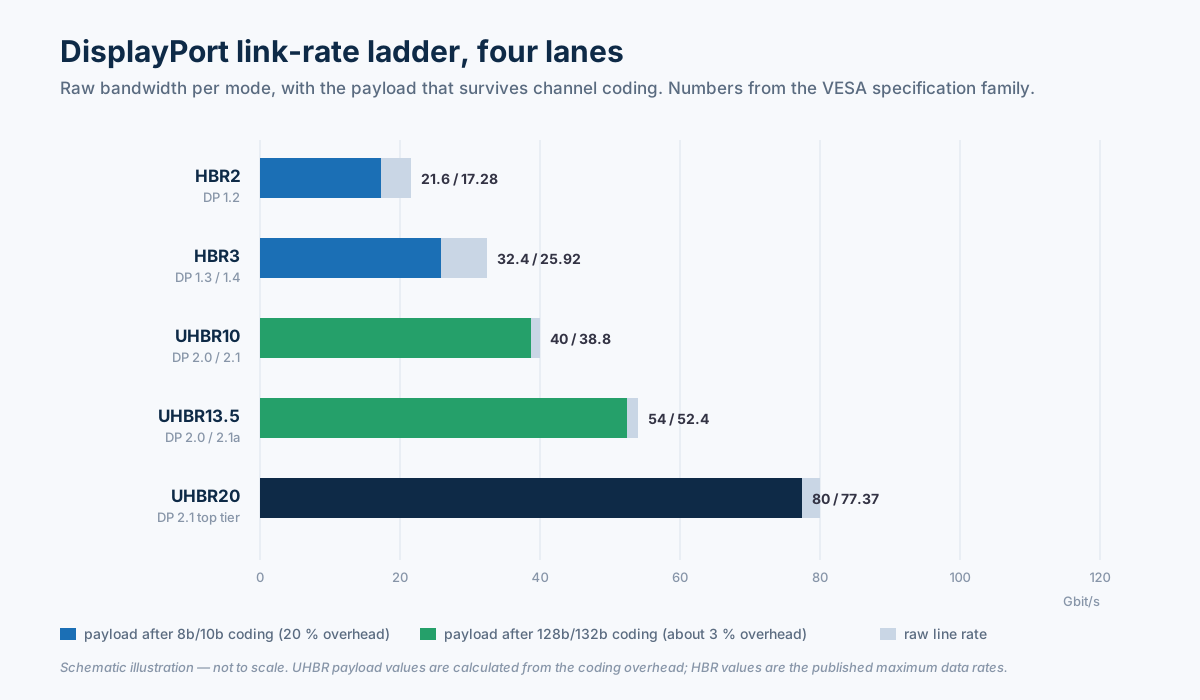
High Bit Rate 2 arrived with DisplayPort 1.2 in January 2010: 5.4 Gbit/s per lane, 21.6 Gbit/s across four lanes, and 17.28 Gbit/s of payload after 8b/10b encoding. That is enough for 4K at 60 Hz with 10-bit colour, and it is the reason certified DisplayPort cables are described by VESA as supporting HBR2 as a floor. HBR2 remains the correct answer for office monitors, digital signage players, POS terminals and the overwhelming majority of adapter cables sold into distribution. It is also the mode a marginal cable silently falls back to.
HBR3 — the step most “1.4” products actually mean
High Bit Rate 3 arrived with the DisplayPort 1.3 revision and carried straight into 1.4: 8.1 Gbit/s per lane, 32.4 Gbit/s raw, 25.92 Gbit/s payload, still on 8b/10b coding. HBR3 covers 4K at 120 Hz at 24 bit, 5K at 60 Hz at 30 bit, and 8K at 30 Hz uncompressed. In 2018 VESA introduced the DP8K certification label specifically for cable assemblies built and tested to hold HBR3, because the older certified cables only guaranteed HBR2. If a datasheet says “DP 1.4” and quotes 8K, the underlying mode is HBR3 plus DSC, and the cable has to be a DP8K-class assembly.
UHBR10, UHBR13.5 and UHBR20 — the 2019 jump
DisplayPort 2.0, released in June 2019 and folded into 2.1 in October 2022, replaced 8b/10b with 128b/132b channel coding and defined three Ultra High Bit Rate modes. The coding change is the underrated part: 8b/10b throws away 20 % of the line rate, while 128b/132b throws away about 3 %, so a 40 Gbit/s UHBR10 link delivers roughly the payload of a 48 Gbit/s 8b/10b link. At the top, UHBR20 puts 20 Gbit/s on each of four lanes for 80 Gbit/s raw and a maximum payload of 77.37 Gbit/s — about three times the HBR3 payload.
| Mode | Introduced with | Per lane | Four-lane raw | Payload | Coding |
|---|---|---|---|---|---|
| RBR | DP 1.0 | 1.62 Gbit/s | 6.48 Gbit/s | 5.18 Gbit/s | 8b/10b |
| HBR | DP 1.0 | 2.70 Gbit/s | 10.80 Gbit/s | 8.64 Gbit/s | 8b/10b |
| HBR2 | DP 1.2 | 5.40 Gbit/s | 21.60 Gbit/s | 17.28 Gbit/s | 8b/10b |
| HBR3 | DP 1.3 | 8.10 Gbit/s | 32.40 Gbit/s | 25.92 Gbit/s | 8b/10b |
| UHBR10 | DP 2.0 | 10.0 Gbit/s | 40.0 Gbit/s | about 38.8 Gbit/s | 128b/132b |
| UHBR13.5 | DP 2.0 | 13.5 Gbit/s | 54.0 Gbit/s | about 52.4 Gbit/s | 128b/132b |
| UHBR20 | DP 2.0 | 20.0 Gbit/s | 80.0 Gbit/s | 77.37 Gbit/s | 128b/132b |
Table 1 — the complete DisplayPort link-rate set. RBR, HBR, HBR2 and HBR3 payloads are the published maximum data rates at 80 % coding efficiency; UHBR payloads are calculated from the roughly 3 % overhead of 128b/132b, with UHBR20 quoted as the 77.37 Gbit/s figure VESA publishes.
DSC: what it is, and what it is not
Display Stream Compression is where most commercial conversations go wrong, because “compression” carries a decade of baggage from video codecs. VESA published DSC as a visually lossless codec for display links. Its own description of the design is specific: typical compression ratios from 1:1 to about 3:1, a decoder under 100,000 gates, no more than one raster scan line of added latency (under 8 µs in a 4K 60 Hz system), and validation through roughly 250,000 subjective image comparisons rather than a single objective score.
Those four properties are what make DSC usable inside a monitor rather than inside a streaming service. It is line-based and intra-frame, so there is no frame buffer and no temporal smear on motion; the latency is a fraction of a scan line, so it does not disturb a mouse cursor or a game engine; and the ratio is fixed by the link budget rather than chosen scene by scene, so the picture does not change character when the content changes. It is also not chroma subsampling: 4:2:0 throws away colour resolution permanently, while DSC reconstructs full 4:4:4 at the sink. On DisplayPort 1.4a, 8K at 60 Hz needs only a 2:1 ratio at 24 bit and 2.5:1 at 30 bit — well inside the codec's range, which is why VESA describes that result as visually lossless rather than as a compromise.
For a cable buyer the consequence is counter-intuitive. DSC is negotiated between the source and the sink; a passive cable has no idea whether the stream is compressed. So “DSC support” is never a cable specification — it is a device specification that changes how much bandwidth the cable has to carry. Two identical-looking 4K 240 Hz monitors can place completely different demands on the lead, one asking for UHBR20 and the other fitting into HBR3 with DSC and 4:2:2 fallback. Since DisplayPort 2.1b, DSC with FEC is mandatory for certification, so the feature itself is no longer a differentiator; the link rate it is paired with still is.
Link training: the mechanism behind every “it works on my desk” argument
DisplayPort negotiates its link at every hot-plug. The source starts at the highest rate it and the sink both claim, runs a training pattern, and reads back the receiver's report. If the error rate is too high, it retrains lower — fewer lanes, or a slower mode — until the link is stable. VESA lists link training and link quality monitoring among the reasons DisplayPort is more robust than the older video interfaces, and that is true at the protocol level. It is also the reason cable faults do not announce themselves.
A marginal assembly does not usually produce a dead screen. It produces a link that trains at HBR2 instead of HBR3, or on two lanes instead of four, and the operating system reports a perfectly healthy display running at a lower refresh rate. The customer sees “8K not available”, an intermittent black frame when the monitor wakes, a flicker on a 4 m run, or a 4K 144 Hz panel that will only accept 4K 120 Hz. Every one of those symptoms is a bandwidth shortfall, and every one of them will be blamed on the cable, the GPU and the monitor in that order.
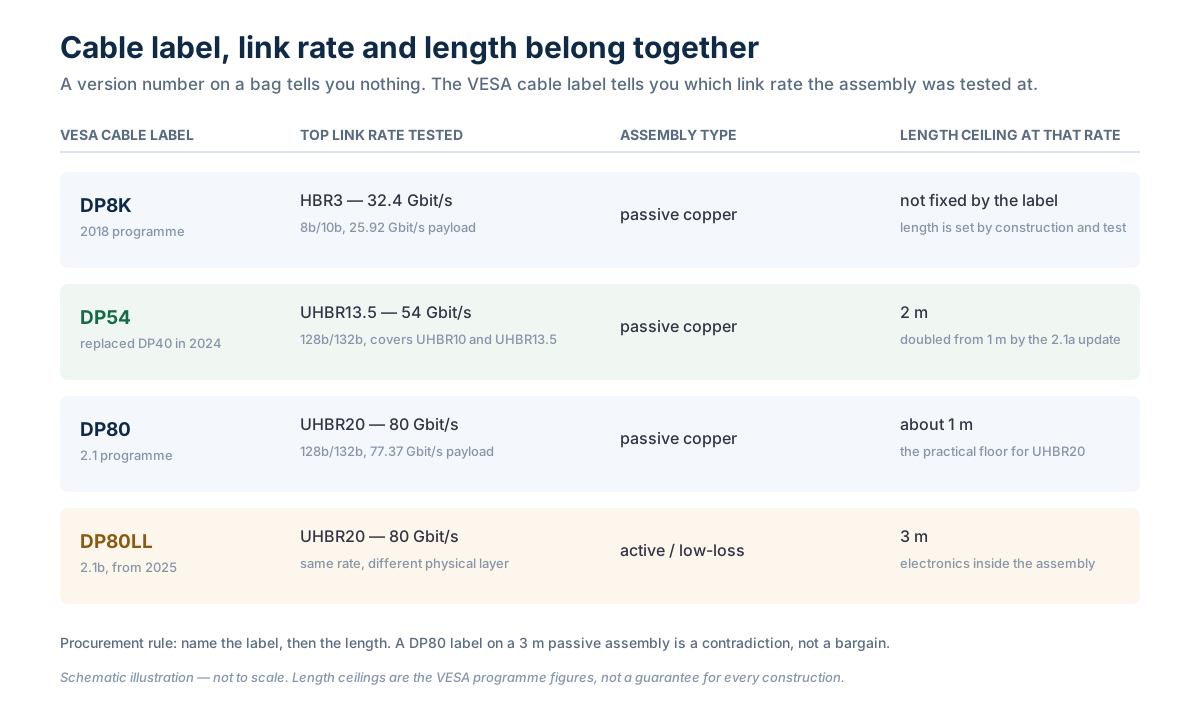
This is why length and rate cannot be specified separately. At 20 Gbit/s per lane the eye at the receiver is a fraction of the width it is at HBR2, and insertion loss, impedance control at the connector launch, pair-to-pair skew and shield termination all eat into it. VESA's certified cable programme reflects the physics directly: a DP80 passive assembly is a roughly one-metre product, and the 2.1a update only doubled the length ceiling for UHBR13.5 by creating the DP54 tier at two metres. UHBR20 beyond that requires the DP80LL low-loss active cable specification, which reaches three metres by putting electronics inside the assembly.
DP Alt Mode: when the cable is a USB-C cable, not a DisplayPort cable
A growing share of DisplayPort volume never touches a DisplayPort connector. DisplayPort Alt Mode repurposes the four high-speed lanes of a USB Type-C cable for DisplayPort traffic, negotiated through USB Power Delivery. VESA's own guidance is specific about the wiring: all four lanes are available, which is why Alt Mode can match a native connector, but when SuperSpeed USB has to run at the same time the link drops to two lanes and the available video bandwidth halves.
Two procurement consequences follow. First, a USB-C to DisplayPort adapter cable is the recommended accessory, and VESA explicitly warns against USB-C to DisplayPort receptacle adapters paired with a separate DP cable, because the combination invites intermittent operation and lost video. Second, and more expensive to get wrong: a USB-C assembly is certified as a USB-C or USB4 product, not as a DP54 or DP80 cable. The DP80 and DP80LL labels belong to DisplayPort connector assemblies. A supplier who quotes a “DP80 USB-C cable” is describing something that does not exist as a VESA category, and the label will not survive an audit.
Our own DisplayPort cable range is built around this split: DP-to-DP assemblies in HBR2 and HBR3 constructions, Mini DP variants, DP to HDMI, DVI and VGA adapter leads, and USB-C to DP Alt Mode cables as a separate family with its own certification evidence. The USB-C range carries the Alt Mode leads, and the switch and splitter range covers the MST hubs that decide how a single DP port is divided.

The length table that decides the quotation
Most DisplayPort disputes are length disputes wearing a bandwidth costume. The table below pairs the link rate with the assembly type that can physically carry it, using VESA's published cable programme figures rather than a supplier's optimistic claim. Read it as a screening tool: anything outside these boxes needs a test report before it needs a price.
| Design target | Link rate needed | Cable label to ask for | Passive length ceiling | If the run is longer |
|---|---|---|---|---|
| 4K 60 Hz, office and signage | HBR2, 21.6 Gbit/s | Certified DisplayPort cable (HBR2 floor) | 2–3 m typical | Active or optical assembly, or an HDBaseT extender |
| 4K 120 Hz, 5K 60 Hz | HBR3, 32.4 Gbit/s | DP8K | 2–3 m typical, construction dependent | Active DP 1.4 assembly, 5–10 m class |
| Dual 4K 144 Hz from one port | UHBR10, 40 Gbit/s | DP54 | 2 m | Re-plan the topology before extending the cable |
| 8K 60 Hz without DSC, high refresh 5K | UHBR13.5, 54 Gbit/s | DP54 | 2 m | DP80LL active, or move the source closer |
| 8K 120 Hz, 4K 240 Hz, 16K with DSC | UHBR20, 80 Gbit/s | DP80, or DP80LL above 1 m | about 1 m | DP80LL active at 3 m; beyond that, an optical link |
Table 2 — rate, label and length in one line. The passive ceilings for the UHBR tiers are the VESA programme figures from the 2.1a and 2.1b updates; the HBR2 and HBR3 entries are typical industry practice, because the DP8K label certifies performance at HBR3 without fixing a length.

What to write on the purchase order
A DisplayPort line item that survives a factory, a forwarder and an incoming inspection has to be written as a set of testable clauses. “DP 2.1 cable” is not one of them. The table below is the version we recommend to distributors and OEM project buyers, and it is deliberately repetitive: every clause maps to something that can be measured, photographed or rejected.
| PO field | Write this, not that | How it is verified |
|---|---|---|
| Link rate | “HBR3, 8.1 Gbit/s per lane, 4 lanes” — not “DP 1.4” | Eye diagram or BER report at the stated rate |
| Certification label | DP8K, DP54, DP80 or DP80LL by name, with certificate reference | VESA listing plus label on the assembly |
| Assembly type | Passive copper, active redriver or optical — stated explicitly | Cross-section and BOM review |
| Length | Metres with tolerance, measured plug tip to plug tip | Sample measurement on arrival |
| Connector and latch | Full-size DP male, 20-pin populated, latch or screw-lock | Go gauge, mating force, pull test |
| Conductor gauge | e.g. 30 AWG signal pairs, 28 AWG power, stated per pair | Cross-section photograph with the first shipment |
| Shielding | Foil plus braid coverage per pair and overall, with drain wire termination | Cross-section plus 360° termination photo |
| DSC and FEC | Declared at device level for adapters; “not applicable” for passive cable | Chip datasheet or firmware note |
| HDCP | HDCP 2.2 or 2.3 where protected content is in scope | Repeater test with a licensed source |
| Jacket | PVC or LSZH, with the fire class if the project declares one | Compound data sheet and test report |
| Acceptance | 100 % aging and continuity, plus sampled high-rate functional test; remedy for a failed lot | Test log shipped with the goods |
Table 3 — eleven fields that replace the phrase “DP 2.1 cable”. Fields 1, 2, 3 and 4 do the work; the rest prevent a silent downgrade in construction.
The naming traps that cost real money
Four phrases recur in every DisplayPort negotiation we see, and each one hides a different failure.
- “DP 2.1” is not “DP 2.1 UHBR20”. A 2.1-certified device may run at HBR2 and still be compliant, because VESA certifies 2.1b products at a minimum of HBR2 with DSC. The tier is a separate fact and has to be asked for by name.
- “DP 1.4” is not a cable grade. HBR3 arrived in 1.3, before 1.4 existed, and VESA has never published a “DP 1.4 cable” category. The labels it does publish are DP8K for HBR3, DP54 for UHBR13.5, DP80 for UHBR20 and DP80LL for the active UHBR20 version. A bag that says only “1.4” is telling you nothing about the assembly.
- Passive and active are not interchangeable. A passive assembly is copper and moulding; an active one contains a redriver that draws power from the source and has its own failure modes, its own cost and its own length ceiling. Quoting “3 m UHBR20” without saying which one is quoting the wrong product.
- DSC is not “compressed picture quality”. It is a fixed-ratio, line-based, visually lossless codec with under one scan line of latency, and it is mandatory in DisplayPort 2.1b certification. Treating it as a quality compromise leads buyers to pay for bandwidth they do not need; treating it as free leads them to promise a resolution the link cannot carry without it.
- “8K cable” is a resolution claim on a component that cannot make one. Resolution is the outcome of link rate, DSC budget and sink capability. The correct claim is the rate and the label; the resolution follows.
Five mistakes and what they cost
- Buying a version number. The goods are compliant and still cannot run the mode the project needs. The re-quote lands on the buyer, and the schedule slips by a full production cycle.
- Specifying UHBR20 over three metres in passive copper. The factory ships the only thing it can build — a shorter or lower-rate assembly with the right printing — and the failure appears at the integrator, not at goods-in.
- Accepting a datasheet resolution without a rate. “8K 60 Hz” is achievable at HBR3 with DSC and at UHBR20 without it. Both statements are true, and they describe cables that cost very different amounts.
- Forgetting the Alt Mode lane split. A dock that runs USB 3 data and video at the same time gets two lanes, so a design budgeted on four lanes arrives at half the bandwidth.
- Skipping the incoming high-rate test. A continuity check passes every assembly that will fail at 8 Gbit/s per lane, which is exactly the population that matters.
Procurement checklist
- Ask the sink vendor for the link rate and the DSC requirement, not the DisplayPort version.
- Convert that into one of the five modes and write the mode number on the PO.
- Choose the connector pair — DP, Mini DP, USB-C Alt Mode — and confirm which end carries the certification.
- Fix the length before the price, and treat any passive UHBR20 request above one metre as a design error.
- Name the VESA cable label you expect and ask for the certificate reference in the quotation.
- State the assembly type: passive, active or optical.
- Put conductor gauge and shield construction on the order so a cost-down cannot happen quietly.
- Declare HDCP and DSC at device level for anything with a chip inside.
- Agree the acceptance test and the remedy for a failed lot before the deposit.
- Keep a golden sample and the test log with the first shipment, and compare every later lot against it.
FAQ
Is a DisplayPort 2.1 cable automatically faster than a 1.4 cable?
No. The version describes the document the product was tested against, and VESA certifies 2.1b devices at a minimum of HBR2 with DSC. A 2.1 assembly can therefore be slower than a DP8K assembly built for HBR3. Ask for the link rate and the cable label.
Do I need DSC if I buy a UHBR20 cable?
DSC is a source and sink feature, so the cable neither needs it nor provides it. What the cable provides is the 80 Gbit/s link that lets the source run higher resolution and refresh combinations before compression is required. If the sink does not support DSC, the link rate becomes the only lever, which makes the cable choice more important rather than less.
Why does a 3 m cable work at 4K 60 Hz but fail at 4K 144 Hz?
Because the second mode needs a higher link rate, and the assembly cannot hold the eye at that rate over that length. The link trains down to a rate it can sustain, so the display still works — at a lower refresh rate than the customer paid for. The fault is length against rate, not a defective cable.
Can I use a USB-C to DisplayPort cable for a DP80 link?
You can carry DisplayPort 2.1 features over Alt Mode, and VESA states that all 2.1b features are available on Alt Mode. But the assembly is certified as a USB-C or USB4 product, not as a DP80 cable, and if SuperSpeed USB shares the connector the video link drops to two lanes. Specify it as an Alt Mode cable with its own rating.
What single sentence should go on the PO?
“DisplayPort assembly, four-lane UHBR13.5 (54 Gbit/s), VESA DP54 certified, passive, 2.0 m, 30 AWG, foil plus braid, certificate reference to be supplied with the quotation.” Every clause in that sentence can be measured, and none of it can be satisfied by printing a version number on a bag.
Conclusion
DisplayPort 1.4 and 2.1 are not two grades of the same product; they are two documents that describe a set of optional capabilities, one of which — the link rate — is the only one a cable can actually deliver. Once the conversation moves from versions to modes, the rest follows: HBR3 for the volume business, UHBR10 and UHBR13.5 for the new high-refresh tier, UHBR20 for the small number of designs that genuinely need 77 Gbit/s of payload and can live with a one-metre passive lead or a three-metre active one. DSC then stops being a mysterious quality question and becomes a bandwidth budget item, and length stops being a freight decision and becomes an electrical one. Write the mode, the label, the length and the test onto the order, and the argument about “whether the cable does 8K” never happens.
Sources
VESA, DisplayPort FAQ (displayport.org, retrieved 2026-11) — 2.1b certification at a minimum of HBR2 with DSC, the explicit statement that UHBR is not required for 2.1b certification, 128b/132b coding at about 3 % overhead against 20 % for 8b/10b, 77.37 Gbit/s maximum payload, DP80LL active cables to 3 m, DSC published 2014 with 1:1 to 3:1 ratios, a decoder under 100k gates and under one scan line of latency, and DP 1.4a reaching 8K 60 Hz at 2:1 or 2.5:1. VESA press release, VESA Announces DisplayPort Updates and Extensions for Gaming and Automotive Market at CES (8 January 2024) — DP54 replaces DP40, UHBR13.5 at 54 Gbit/s over a two-metre passive cable, UHBR20 continuing on DP80. VESA press release, VESA to Update DisplayPort 2.1 with New Active Cable Specification for Up to 3X Longer DP80 Cables (6 January 2025) — DP80LL, UHBR20 over an active cable up to three metres, and the one-metre DP80 passive reference. VESA/DisplayPort, How to Choose a DisplayPort Cable and Not Get a Bad One (retrieved 2026-11) — all certified cables support HBR2, DP8K certifies HBR3-class assemblies, and the warning against USB-C to DP receptacle adapters. Wikipedia, DisplayPort (retrieved 2026-11), citing the VESA 1.2 (7 January 2010), 1.3 (15 September 2014), 1.4 (1 March 2016), 2.0 (26 June 2019), 2.1 (17 October 2022) and 2.1a (8 January 2024) releases — the per-lane rates, 21.6 / 32.4 / 80 Gbit/s totals, 17.28 / 25.92 / 77.37 Gbit/s payloads and the DP54 replacement of DP40. Digital Trends, With DisplayPort 2.1, longer cables won't reduce throughput (17 October 2022) — USB4 PHY alignment and the bandwidth management feature for tunnelling. Payload figures for UHBR10 and UHBR13.5 in Table 1 are calculated from the published coding overhead and are labelled as calculated; length ceilings for HBR2 and HBR3 are industry practice, not VESA programme numbers, and are labelled as typical.